Panier vide

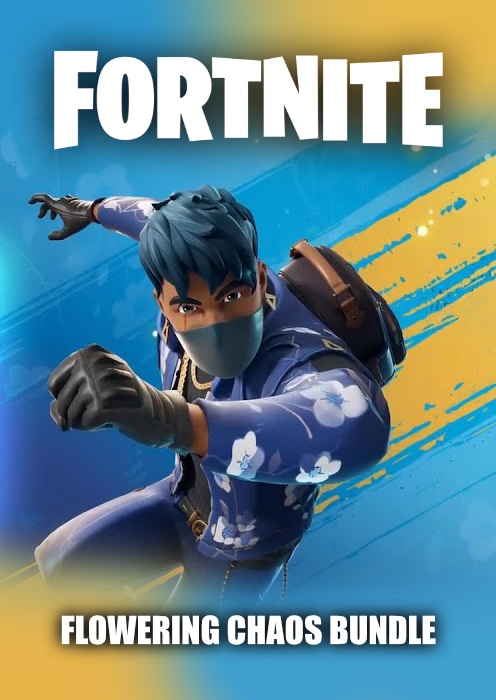
Fortnite Flowering Chaos Bundle PS5 (US)
–55%
")
Livraison:
Code d'activation
Plate-forme:
PS5 /
Sony Playstation
Langues:
Multi-language
Région:
USA
Développeur:
Epic Games
Éditeur:
Epic Games

Vidéo
Développez votre empire tout en semant les graines du chaos avec le pack Chaos fleuri de Fortnite !
Le pack Fortnite Flowering Chaos comprend :
- 1000 V-Bucks
- Tenue de Florin (style LEGO)
- Sac à dos Blossom avec accessoire de dos
- Pioche de finition florale
- Enveloppe à fleurs bleues
- Guitare Petal's Edge
- Micro Blue Bloom
- Baskets Petal Steppers
Les V-Bucks sont la monnaie virtuelle de Fortnite, utilisable dans les modes Battle Royale, Créatif et Sauver le monde. Dans Battle Royale et Créatif, vous pouvez acheter de nouveaux objets de personnalisation comme des tenues, des planeurs, des pioches, des emotes et des revêtements ! Dans Sauver le monde, vous pouvez acheter des lamas à rayons X contenant des schémas d'armes et de pièges, ainsi que de nouveaux héros et bien plus encore !
Ce produit ne peut être activé que sur les comptes Sony PlayStation enregistrés aux États-Unis. L'activation s'effectue via votre console PlayStation 5. Cette version du produit est compatible uniquement avec la PlayStation 5.
Activation — PSN
How to redeem your code via your PC:
- Go to PlayStation Store https://store.playstation.com
- Log into your PlayStation account in the top right of the screen.
- Click on your Avatar at the top of the screen.
- Select Redeem Codes from the drop-down menu.
- Carefully enter the code and select Redeem.
- The credit or content is now applied to your account.
How to redeem your digital code via PlayStation 5:
- On the PlayStation5 Game Home Menu highlight and select the PlayStation Store hub with the cross button on your wireless controller.
- Navigate up to the top menu Categories bar in the Store and select a "..." icon next to the shopping cart icon.
- Highlight and select “Redeem Code” from the list of options.
- Enter your code and press the cross button to continue.
- Now you will see the content you are redeeming. Highlight the confirm option and the cross button.
- A message will appear confirming that the code has been redeemed, press the button on "OK".
- The content should download automatically but if it does not, or if you would like to manually download the content, visit the game page In your Game Library from the Games Home Menu.
How to redeem your digital code via PlayStation 4:
- On the PlayStation 4 Home screen highlight and select PlayStation Store with the cross button on your wireless controller.
- From the list of store categories on the left of the screen, press the down button until you can highlight and select “Redeem Codes” with the cross button.
- Press the cross button to enter your code, then press the R2 button and select Continue.
- Now you will see a list of the digital content you are redeeming. Highlight the confirm option and press the cross button.
- A message will appear confirming that the code has been redeemed, press the cross button on "OK".
- The content should download automatically but if it does not, or if you would like to manually download the content, visit the game tile under your Library in the Home screen.
Commentaires
Aucun post trouvé
Développez votre empire tout en semant les graines du chaos avec le pack Chaos fleuri de Fortnite !
Le pack Fortnite Flowering Chaos comprend :
- 1000 V-Bucks
- Tenue de Florin (style LEGO)
- Sac à dos Blossom avec accessoire de dos
- Pioche de finition florale
- Enveloppe à fleurs bleues
- Guitare Petal's Edge
- Micro Blue Bloom
- Baskets Petal Steppers
Les V-Bucks sont la monnaie virtuelle de Fortnite, utilisable dans les modes Battle Royale, Créatif et Sauver le monde. Dans Battle Royale et Créatif, vous pouvez acheter de nouveaux objets de personnalisation comme des tenues, des planeurs, des pioches, des emotes et des revêtements ! Dans Sauver le monde, vous pouvez acheter des lamas à rayons X contenant des schémas d'armes et de pièges, ainsi que de nouveaux héros et bien plus encore !
Ce produit ne peut être activé que sur les comptes Sony PlayStation enregistrés aux États-Unis. L'activation s'effectue via votre console PlayStation 5. Cette version du produit est compatible uniquement avec la PlayStation 5.
How to redeem your code via your PC:
- Go to PlayStation Store https://store.playstation.com
- Log into your PlayStation account in the top right of the screen.
- Click on your Avatar at the top of the screen.
- Select Redeem Codes from the drop-down menu.
- Carefully enter the code and select Redeem.
- The credit or content is now applied to your account.
How to redeem your digital code via PlayStation 5:
- On the PlayStation5 Game Home Menu highlight and select the PlayStation Store hub with the cross button on your wireless controller.
- Navigate up to the top menu Categories bar in the Store and select a "..." icon next to the shopping cart icon.
- Highlight and select “Redeem Code” from the list of options.
- Enter your code and press the cross button to continue.
- Now you will see the content you are redeeming. Highlight the confirm option and the cross button.
- A message will appear confirming that the code has been redeemed, press the button on "OK".
- The content should download automatically but if it does not, or if you would like to manually download the content, visit the game page In your Game Library from the Games Home Menu.
How to redeem your digital code via PlayStation 4:
- On the PlayStation 4 Home screen highlight and select PlayStation Store with the cross button on your wireless controller.
- From the list of store categories on the left of the screen, press the down button until you can highlight and select “Redeem Codes” with the cross button.
- Press the cross button to enter your code, then press the R2 button and select Continue.
- Now you will see a list of the digital content you are redeeming. Highlight the confirm option and press the cross button.
- A message will appear confirming that the code has been redeemed, press the cross button on "OK".
- The content should download automatically but if it does not, or if you would like to manually download the content, visit the game tile under your Library in the Home screen.
Aucun post trouvé